Artificial Intelligence has completely reshaped digital art, photography, and visual storytelling. One of the most exciting and fast-growing trends right now is AI Ghost Photos—realistic, eerie, and cinematic ghost images generated using AI tools.
These ghost-style visuals are widely used for horror storytelling, paranormal content, social media edits, thumbnails, YouTube Shorts, TikTok videos, Instagram Reels, and creative art projects.
In this complete guide, you’ll learn how to create AI ghost photos step by step, which tools work best, how to write powerful prompts, how to improve realism, and which mistakes you should avoid. Whether you’re a beginner or an advanced creator, this tutorial will help you master AI ghost photo creation.
What Are AI Ghost Photos?
AI ghost photos are AI-generated or AI-enhanced images that show ghostly or paranormal figures inside realistic environments. These images are created using artificial intelligence models that understand human anatomy, lighting, shadows, textures, depth, and cinematic composition.
AI ghost photos commonly include:
-
Transparent or semi-transparent human figures
-
Mist, fog, smoke, or glowing effects
-
Dark, abandoned, or creepy locations
-
Vintage horror photography aesthetics
-
Supernatural lighting and shadow blending
Unlike traditional Photoshop editing, AI makes it possible to generate highly realistic ghost images using only text prompts—without professional cameras or advanced editing skills.
Why AI Ghost Photos Are So Popular
AI ghost images are becoming viral for several reasons:
1) Strong Emotional Impact
Ghost visuals naturally create fear, curiosity, suspense, and mystery—emotions that keep viewers watching longer.
2) Easy to Create
With the right AI tool and a good prompt, anyone can generate high-quality ghost photos in minutes.
3) High Viral Potential
Horror and paranormal content performs extremely well on social media, especially short-form platforms.
4) Cost-Effective
No actors, no locations, no expensive photography setup—AI does everything digitally.
Types of AI Ghost Photos You Can Create
Before you start generating, choose a style that fits your content:
Classic Transparent Ghosts
Soft glowing spirits with faded bodies and smooth transparency.
Shadow Ghosts
Dark silhouettes barely visible in the background—perfect for creepy storytelling.
Victorian / Old-Era Ghosts
Ghosts wearing vintage clothing inspired by old horror photography.
Abandoned Place Spirits
Ghosts appearing in empty houses, forests, hospitals, cemeteries, and streets.
Cinematic Horror Ghosts
High contrast, dramatic lighting, and intense atmosphere—ideal for thumbnails and reels.
✅ Best AI Tools to Create Ghost Photos
You don’t need many tools—just a few powerful ones.
1) Text-to-Image AI Tools
These generate ghost images using text prompts only:
-
AI art generators
-
Diffusion-based models
-
Prompt-driven creative platforms
2) Image-to-Image AI Tools
These allow you to upload a photo and transform it into a ghost-style image.
3) AI Photo Editing Tools
Useful for:
-
Transparency and blending
-
Fog, mist, and smoke effects
-
Lighting and shadows
-
Glow and distortion effects
4) Background Enhancement Tools
Perfect for adding:
-
Dark cinematic fog
-
Horror-style lighting
-
Abandoned buildings
-
Stormy skies
✅ Step-by-Step: How to Create AI Ghost Photos
Step 1: Decide Your Ghost Concept
Before using any AI tool, decide:
-
Is the ghost male or female?
-
Is it clearly visible or hidden?
-
Is the mood scary, emotional, or mysterious?
-
Is the ghost modern or old-era?
A clear concept helps AI generate better results.
Step 2: Choose the Right Environment
The background is just as important as the ghost.
Best environments for ghost photos:
-
Old houses
-
Forests at night
-
Empty streets
-
Abandoned hospitals
-
Cemeteries
-
Dark rooms with window lighting
📌 Tip: Dark and simple backgrounds usually look more realistic.
Step 3: Generate the Ghost Photo Using a Strong Prompt
A powerful prompt is the secret behind realistic AI ghost photos.
Example Prompt (Cinematic Ghost Style)
Prompt:
“A realistic transparent ghost standing in an abandoned hallway at night, soft mist floating around the floor, cinematic lighting, subtle glow, vintage horror photography style, high detail, ultra-realistic, 4K”
Generate multiple versions and choose the best one.
Step 4: Enhance Realism (Pro Tips)
Realism separates basic images from professional-level ghost visuals.
✅ Use Imperfections
Perfect ghosts look fake. Add:
-
Slight motion blur
-
Uneven transparency
-
Minor distortion
✅ Match the Lighting
The ghost must follow the same light direction as the environment.
✅ Avoid Over-Glow
Too much glow destroys realism. Keep it soft and subtle.
✅ Blend Shadows
Even ghost effects need slight shadows to feel naturally placed.
✅ Creating AI Ghost Photos from Real Images (Ethically)
You can also turn real photos into ghost images using image-to-image AI tools.
Best Practices:
-
Use your own photos or royalty-free images
-
Never use real people without permission
-
Avoid deepfake misuse
Image-to-Image Prompt Example:
“Turn this person into a semi-transparent ghost with soft mist and subtle glow, keep the background realistic, cinematic horror lighting, ultra-realistic.”
❌ Common Mistakes to Avoid
Avoid these errors if you want professional results:
1) Overdoing Effects
Too much fog, blur, glow, or distortion makes the image look fake.
2) Weak Prompts
Vague prompts = weak results. Always describe lighting, mood, environment, and style.
3) Ignoring the Background
Bright backgrounds make ghost effects look unnatural.
4) Copying Other Creators
Unique concepts perform better than copied styles—especially for social media.
✅ How to Use AI Ghost Photos for Social Media Content
AI ghost photos work perfectly for:
-
Horror storytelling posts
-
Short-form videos (Reels/Shorts/TikTok)
-
YouTube thumbnails
-
Paranormal content pages
-
Digital art portfolios
-
Blog visuals
To Maximize Engagement:
-
Keep faces partially hidden
-
Use eye contact for tension
-
Add mystery, not full clarity
-
Use cinematic contrast and darkness
⚖️ Ethical and Legal Considerations
Always create responsibly:
-
Don’t impersonate real people
-
Avoid sensitive or offensive content
-
Follow platform rules
-
Label AI-generated content if required
Responsible creation builds long-term trust and growth.
✅ SEO Tips for AI Ghost Photo Blog Content
If you’re posting AI ghost photos on your blog, SEO matters.
Target SEO Keywords:
-
AI ghost photos
-
how to create AI ghost images
-
AI horror photography
-
AI paranormal images
-
ghost photo generator
-
realistic AI ghost prompt
Optimization Tips:
-
Use descriptive SEO titles
-
Add ALT text to every image
-
Write detailed captions
-
Use internal linking
-
Publish consistently
🔥 Copy-Paste Prompt (Shadow Entity Behind a Person)
Prompt:
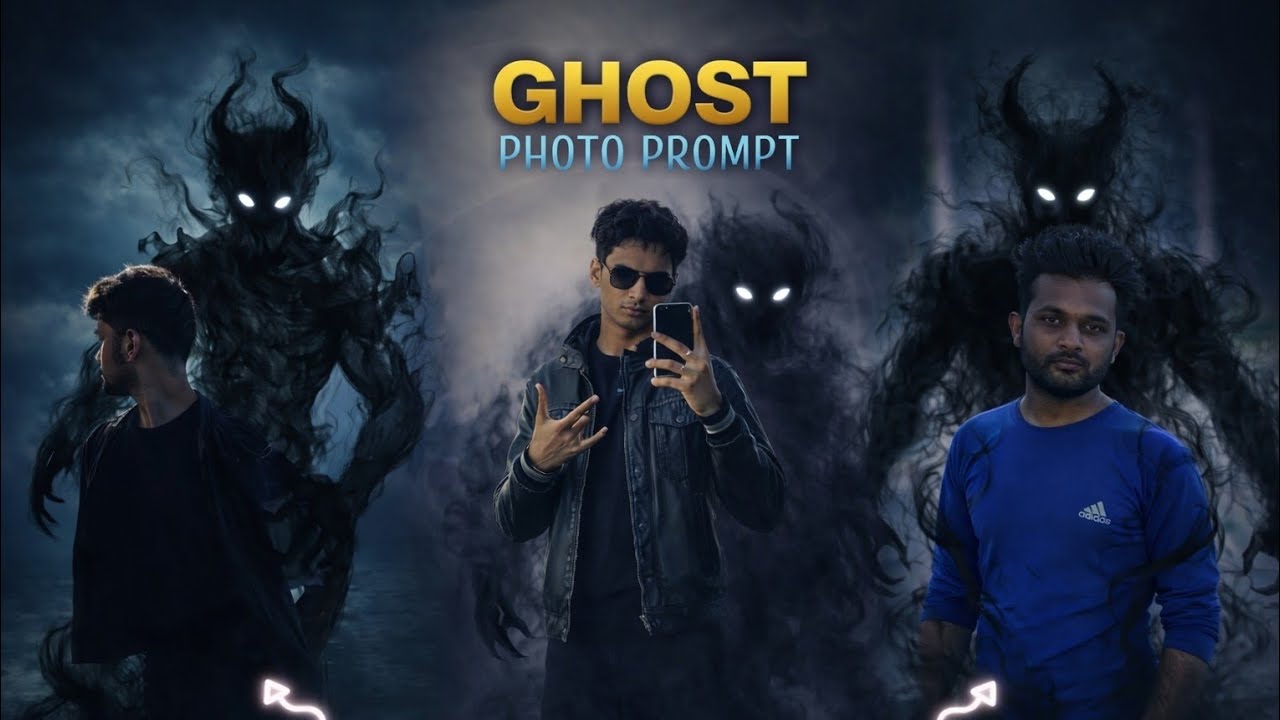
Maintain the person in the foreground exactly as he is, keeping his face, pose, black hoodie, and the background environment identical to the original photo. In a dark, cinematic fantasy style, add a shadowy demonic entity made of swirling semi-transparent black smoke emerging from behind his back. The smoke should wrap subtly around his torso and flow naturally toward the floor. The entity has glowing white eyes piercing through the darkness. Ensure high contrast, moody lighting, and realistic shadows so the creature feels naturally integrated into the scene. Ultra-realistic, 4K quality.
🚀 Future of AI Ghost Photography
AI ghost visuals will become even more advanced with:
-
Motion-based ghost animations
-
3D ghost rendering
-
Hyper-realistic lighting
-
Real-time AI effects
Creators who learn these skills now will stay ahead of upcoming trends.
Final Thoughts
Creating AI ghost photos is no longer limited to professional designers. With the right AI tools, strong prompts, and subtle effects, anyone can create realistic, cinematic, and haunting ghost images.
The key is:
✅ Strong concept
✅ Detailed prompt writing
✅ Subtle realistic effects
✅ Ethical creation
✅ Continuous experimentation
Whether you’re creating horror art, paranormal storytelling, or viral social media content—AI ghost photography gives you endless creative possibilities.